9.1.1 Create budget accounts
Before using the purchase order manager, you need to define your lab budget accounts in LabCollector LIMS.
Go to: Preferences🡪 Reagents and Supplies.
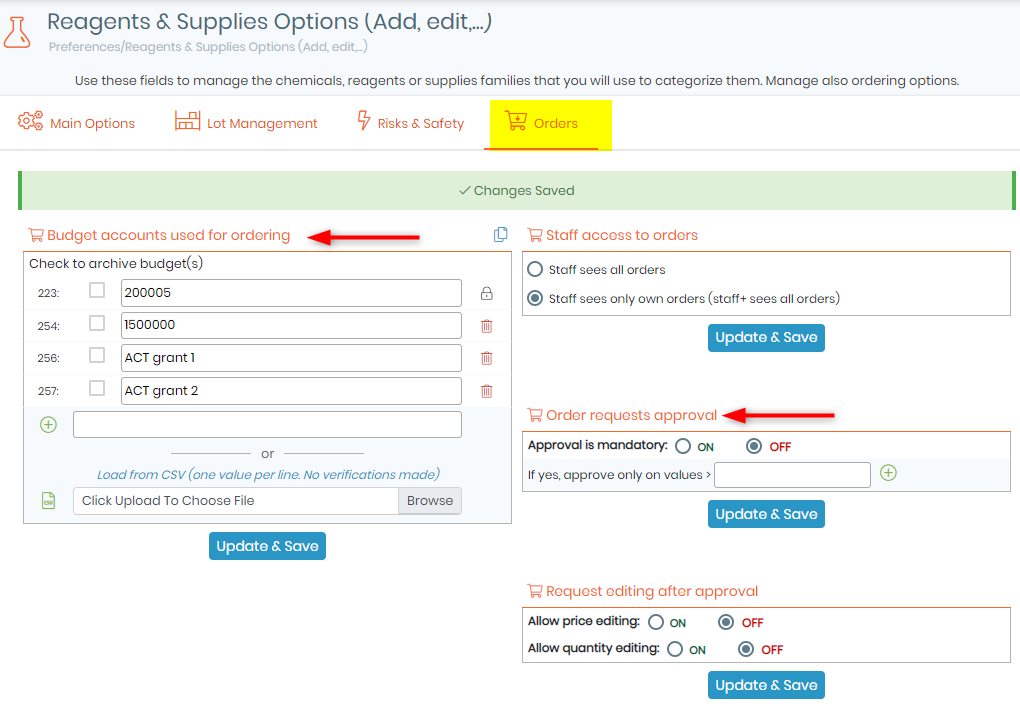
This "Budget accounts used for ordering" menu also allows you to manage the budget accounts needed to process orders. Use it to define a list of your budget accounts that will automatically be display on the order list manager.
To hide/delete accounts, check the box on the left and click on Update & Save button. They will automatically be removed from the list. To view hidden budgets, click on the icon in the top right corner.
There is also the option "Order requests approval" of enforcing approval on items which cost more than a certain amount. There are two possible thresholds – one which can be approved by any administrator (see screenshot above) and the second is approved by the manager of the budget (see section 9-1-2). Depending on the cost of an order request an email will be sent to either all administrators or to the budget manager informing them that there are item(s) to be approved in the order list.