3.1.5 Web services API
A new range of applications based on your LabCollector can be imagined and developed.
Using LabCollector as a back end database, the laboratory can provide remote information in external catalogs, biological resources, etc. Web or mobile tools can be created.
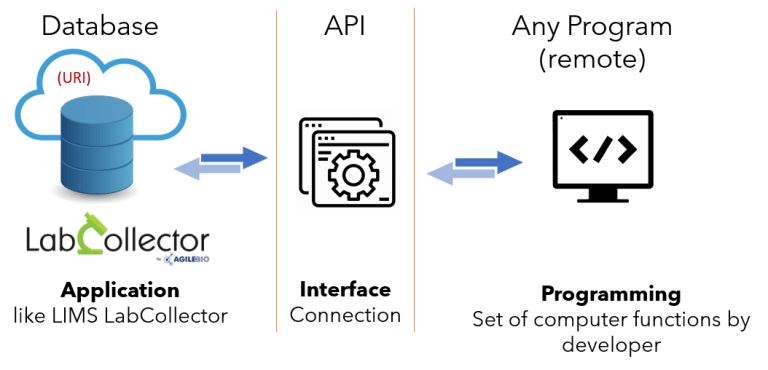
You can read about  KB: LabCollector general setup- 5. Webservices.
You can also read the  KB: an introduction to LabCollector API.
The web-services option will look like below.
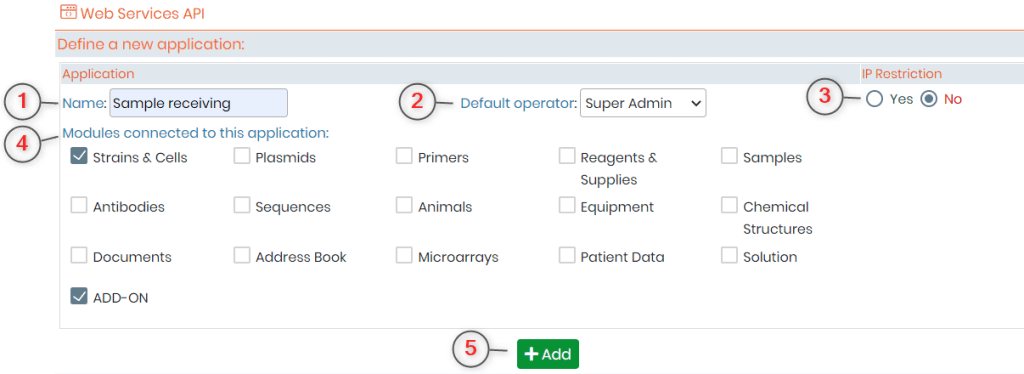
1.NAME: Here you can add the name of your application. For example purpose, we have added the name of our add-on which is sample receiving.
2.DEFAULT OPERATOR: Here you can enter the person whom you want to be the operator for this API. If you don’t add the operator here, then you will have to add it during each request that you will make through API.
3.IP RESTRICTION: This option allows you a layer of security as you can define here which IP (internet protocol) addresses are allowed to work on the API you are defining. Remember that if you choose “yes” then the box to enter IP address will appear only after you save your setting.
4.MODULES CONNECTED TO THIS APPLICATION: There are 12 by default modules present in LabCollector. Apart from this, you can also create new custom add-ons as per your requirements. All the defaults and custom modules and the add-ons will be present here and you can choose which modules you want to interact with the API.
5.ADD: once you have defined your settings you can click on add and you API will look like below.
For more information please refer to this  LabCollector page and
  manual (or
  [email protected] a representative from AgileBio).